Top Free Trade Journaling Tools for CSV Import in 2025: Features, Comparison, and Recommendations

Here is a detailed comparison of some notable free trade journaling tools that support importing broker CSV files, along with their features and a recommendation:
Free Trade Journaling Tools Supporting CSV Import
1. Trinjo (Free Trading Journal)
CSV Import: Supports CSV import from a few brokers (still expanding).
Features: Trade data entry, win rate and profit factor per tag, basic performance metrics.
Limitations: Beta version, lacks options support currently, manual trade addition can be improved.
User Experience: Simple interface, actively developing based on user feedback.
Ideal for: Traders wanting a free, evolving journal with basic import and tagging features1.
2. TradeInsights
CSV Import: Supports importing broker data.
Features: Easy trade data entry, performance reports with filtering and tagging.
User Experience: Basic but functional interface.
Ideal for: Traders looking for a free, all-in-one journal with essential features and minimal cost2.
3. TradeJournal WP (WordPress Plugin)
CSV Import: Imports NinjaTrader CSV files.
Features: Creates daily trade posts, supports trade screenshots, monthly performance summaries, P&L calculations.
Limitations: Currently supports only NinjaTrader; advanced features require Pro upgrade.
Ideal for: NinjaTrader users who want to integrate journaling into WordPress blogs or sites3.
4. TradesViz
CSV Import: Supports multiple brokers and asset classes.
Features: AI-driven insights, multi-asset support (stocks, options, futures, forex, crypto), customizable charts, extensive analytics.
Free Plan: Allows up to 3,000 trades per month.
User Experience: Highly rated for versatility and depth.
Ideal for: Active and professional traders needing advanced analysis and AI features at no cost4.
5. Stonk Journal
CSV Import: No automatic import; manual trade entry only.
Features: Manual tracking, screenshot attachments, performance tracking.
User Experience: Clean and beginner-friendly.
Ideal for: Beginners preferring manual entry and detailed trade review without automation4.
6. TradeZella vs. TraderSync (Brief Comparison)
Both support CSV import and manual entry.
TradeZella: Focuses on a quick performance pulse with the Zella Score, good for essential info at a glance.
TraderSync: More detailed display, better auto-sync options, especially for crypto brokers.
Auto-Sync: Both offer API sync for brokers like ThinkOrSwim, Interactive Brokers, Robinhood.
Ideal for: Traders who want either quick insights (TradeZella) or detailed reports and crypto auto-sync (TraderSync)5.
Feature Comparison Summary
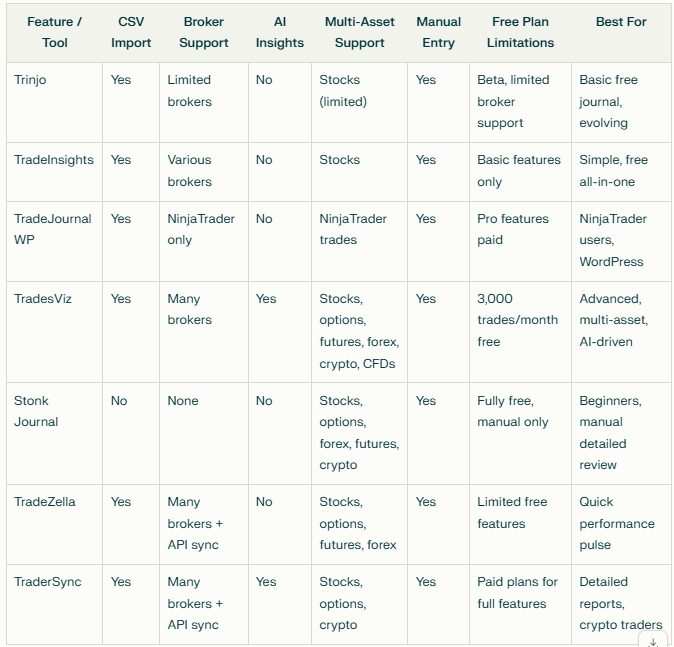
Recommendation
For advanced traders needing multi-asset support, AI-driven insights, and robust analytics with a generous free tier, TradesViz is the top free choice in 2025.
For beginners or traders preferring manual entry, Stonk Journal offers an easy-to-use, free platform without CSV import.
Traders using NinjaTrader and running a WordPress site might prefer TradeJournal WP.
Those looking for a simple, evolving free journal with CSV import can try Trinjo.
For crypto traders wanting auto-sync and detailed reports, TraderSync is recommended, though it is not fully free.